- Code Red/
- Posts/
- ECMP with Two Default Routes on PAN-OS — Setup and Load-Balancing Algorithms Explained/
ECMP with Two Default Routes on PAN-OS — Setup and Load-Balancing Algorithms Explained
Table of Contents
If your firewall has two equal-cost uplinks — two ISPs, two upstream routers, or two parallel links to the same core — PAN-OS can treat them as one logical pipe using Equal-Cost Multi-Path (ECMP). Instead of a primary/backup default route where the second path sits idle until failover, ECMP installs both default routes in the forwarding table and spreads new sessions across them.
This post walks through enabling ECMP on a virtual router with two default static routes, then digs into the four load-balancing algorithms PAN-OS offers and when you’d pick each one. Everything is based on the Palo Alto Networks official ECMP documentation, and the screenshots are from my lab firewall running PAN-OS.
The Scenario #
A PA-VM sits between the LAN and two upstream routers. Both uplinks reach the Internet, and both are usable at all times — we want outbound Internet traffic load-balanced across them rather than active/standby. The virtual router is named lab-vr; the LAN side lives on ethernet1/3 (10.200.10.1/24).
The key ingredient is that both routes must be exactly equal cost: same prefix (0.0.0.0/0), same metric, same admin distance, different next hops. PAN-OS then copies up to Max Path equal-cost routes from the Routing Information Base (RIB) into the Forwarding Information Base (FIB) and load-balances new sessions across them.
One important mental model before the config: ECMP on PAN-OS is per-session, not per-packet. The load-balancing algorithm runs once, at the start of a new session, and every packet belonging to that session follows the same egress path. There is no per-packet spraying — that’s what keeps flows intact and NAT state consistent.
Step 1 — Create Two Equal-Cost Default Routes #
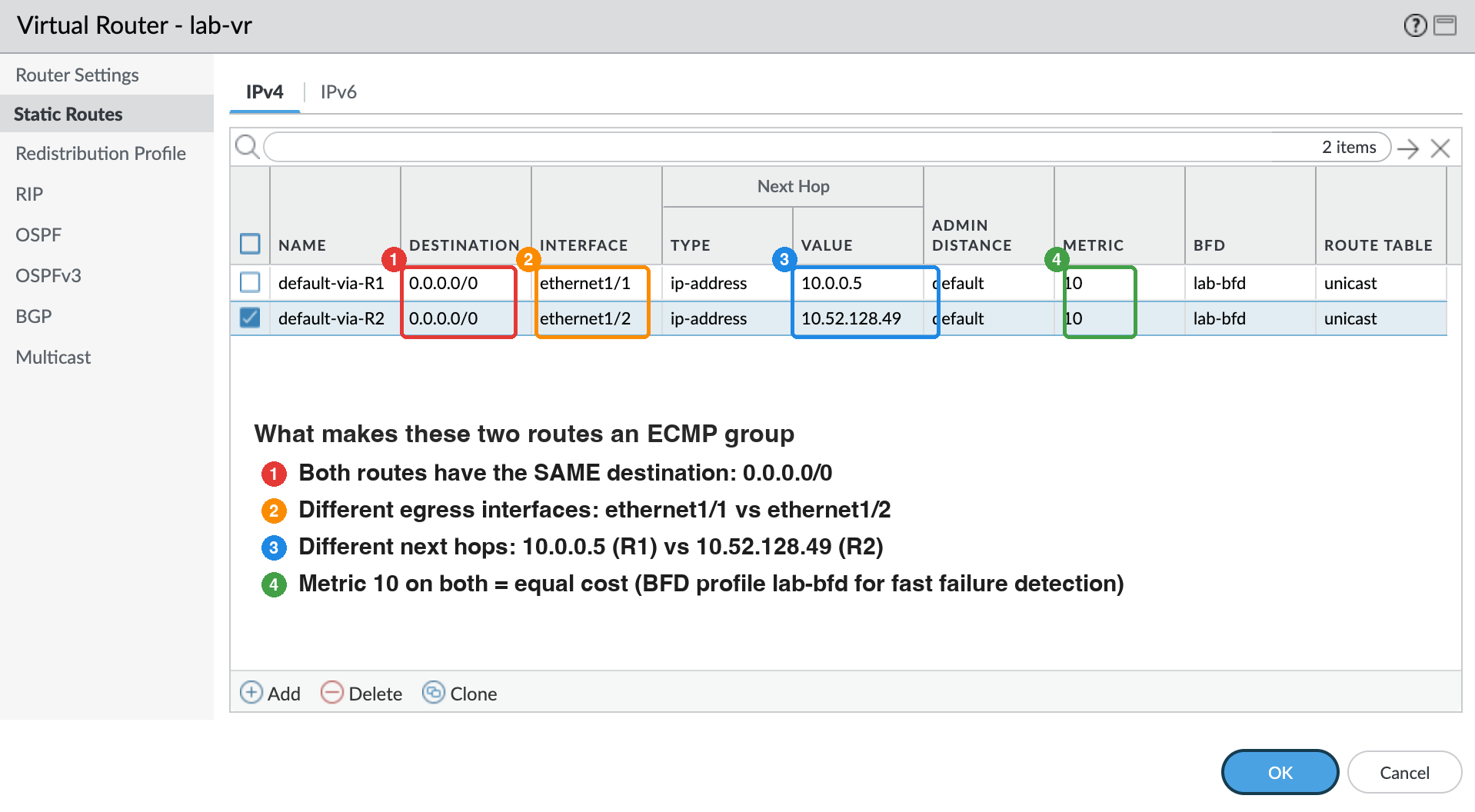
Nothing exotic here: two static routes with the same destination and different next hops.
Network → Virtual Routers → lab-vr → Static Routes → Add:
| Name | Destination | Interface | Next Hop | Admin Distance | Metric | BFD |
|---|---|---|---|---|---|---|
| default-via-R1 | 0.0.0.0/0 | ethernet1/1 | 10.0.0.5 | default | 10 | lab-bfd |
| default-via-R2 | 0.0.0.0/0 | ethernet1/2 | 10.52.128.49 | default | 10 | lab-bfd |
The metric (admin distance for static routes) must match on both routes — if one is lower, it’s simply the primary and you have active/standby, not ECMP. Both routes also reference the BFD profile lab-bfd, so a dead next hop is withdrawn in milliseconds instead of waiting for static-route timers — that pairs nicely with ECMP’s re-balancing behavior.
One thing worth stressing: none of this is specific to the default route. ECMP applies to any set of equal-cost routes to the same destination — configured statically or learned through OSPF/BGP. Two equal-cost paths to 10.20.0.0/16 form an ECMP group exactly like two default routes do, and all four algorithms below apply unchanged. I use 0.0.0.0/0 here because dual-uplink Internet access is the most common use case.
At this point only one of the two routes is installed in the FIB. ECMP is what tells the virtual router to keep both.
Step 2 — Enable ECMP on the Virtual Router #
Network → Virtual Routers → lab-vr → ECMP → Enable.
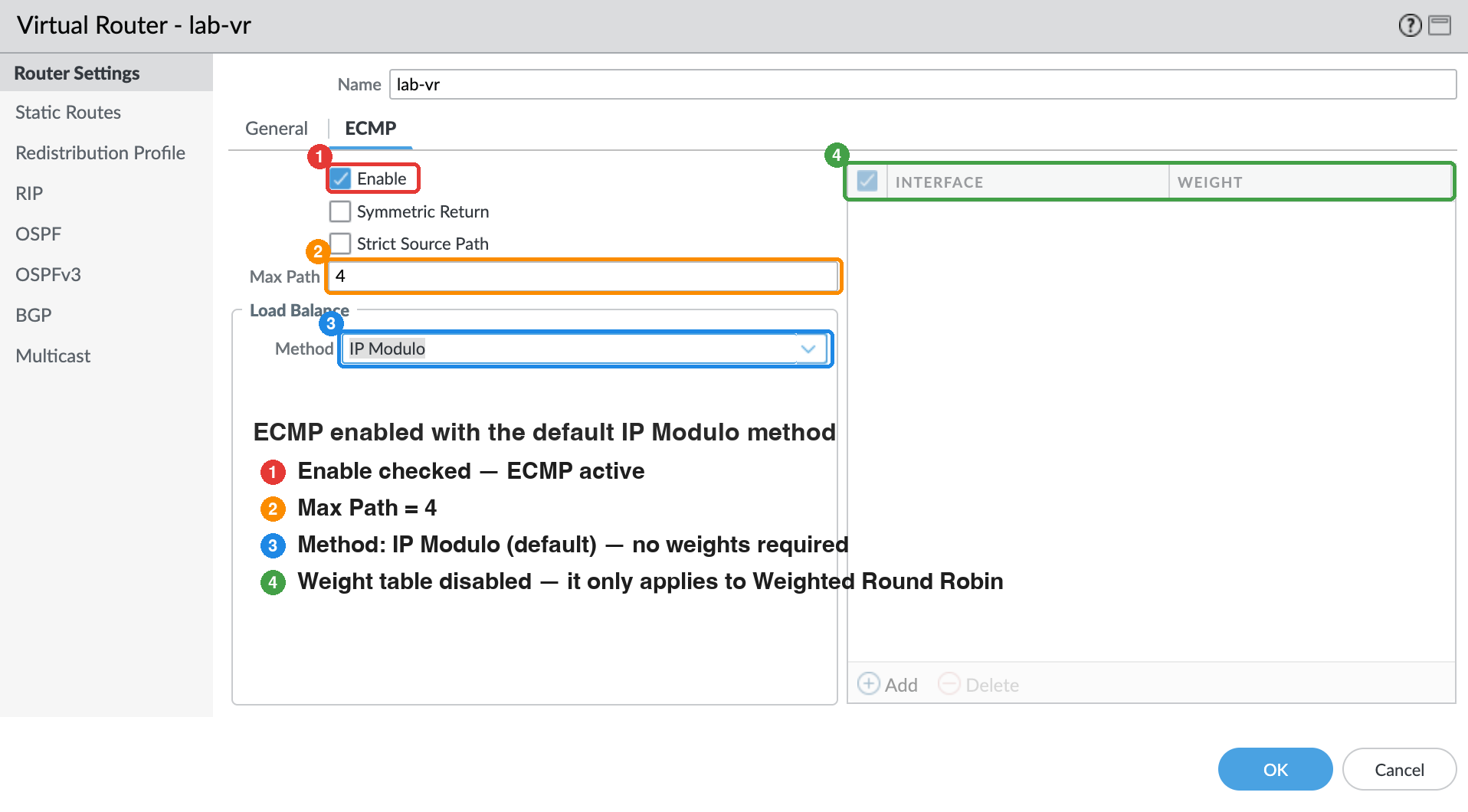
The settings on this tab:
- Enable — turns ECMP on for this virtual router. Note that enabling, disabling, or changing ECMP later restarts the virtual router, which terminates existing sessions. Plan the change window accordingly.
- Symmetric Return — forces return traffic from a server to egress the same interface the request arrived on, overriding ECMP load balancing. Useful when inbound flows (published servers) must answer on the interface they were contacted on, e.g. to satisfy upstream stateful devices or ISP RPF checks. Left unchecked in this lab.
- Strict Source Path — forces IKE/IPsec traffic that originates on the firewall itself to egress the physical interface that owns the tunnel’s source IP, instead of whatever the ECMP algorithm picks. This matters in the dual-ISP IPsec case covered below. Also unchecked here.
- Max Path — how many equal-cost routes to a destination are copied from RIB to FIB: 2, 3, or 4 (default 2). I set it to 4, the maximum, so that adding a third or fourth uplink later doesn’t require another virtual-router restart. With only two default routes installed today it makes no practical difference — but it’s one less interruption when the lab grows.
One hard limitation from the docs: ECMP is not supported when any of the equal-cost routes uses a virtual/logical router as its next hop — none of the routes will be installed in the FIB. The next hop must be a regular interface/IP.
Step 3 — Choose the Load-Balancing Method #
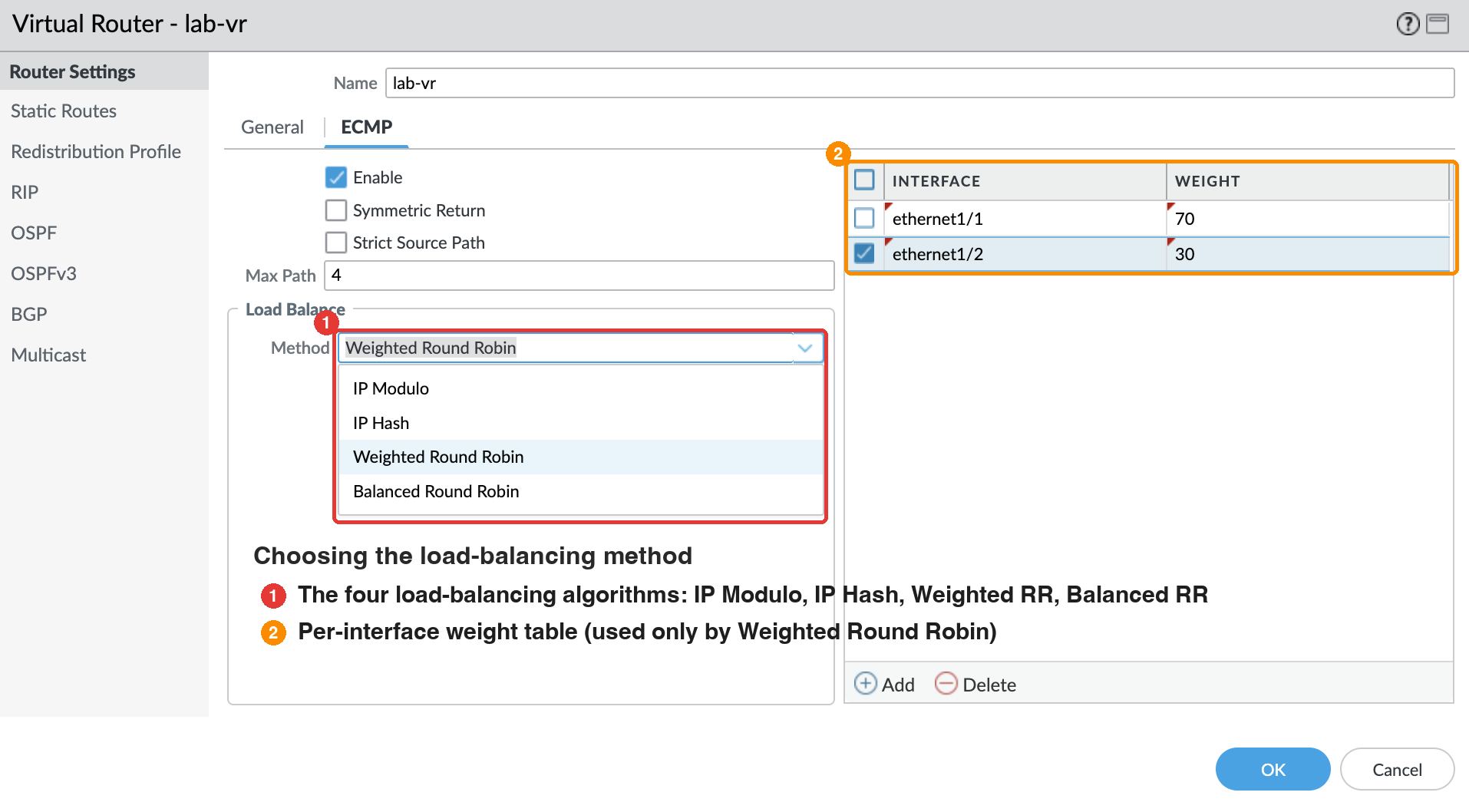
Still on the ECMP tab, Load Balance → Method offers four algorithms. This is the heart of the post, so we’ll go through each one in detail below.
If you select IP Hash, additional options appear: hash on source+destination (default) or Use Source Address Only, optionally include source/destination ports in the hash, and a Hash Seed (up to 9 digits) to further randomize distribution when many sessions share the same tuple.
If you select Weighted Round Robin, you build an ECMP group: add each egress interface and assign it a weight from 1–255 (default 100).
Click OK, accept the virtual router restart prompt, and Commit. ECMP is now live — every new session is pinned to one of the two default routes by the chosen algorithm.
The Four Load-Balancing Algorithms #
A virtual router runs exactly one algorithm at a time. The four options trade off between session stickiness (the same flow always takes the same path — good for troubleshooting and stateful expectations) and load distribution quality, or let you factor in link capacity.
IP Modulo (default) #
The source and destination IP addresses in the packet header are hashed, and the result modulo the number of ECMP paths selects the egress path. Because the hash input never changes for a given flow, every session between the same source/destination pair always takes the same path.
The catch: distribution quality depends entirely on address diversity. If most of your traffic is toward a handful of destinations (one SaaS IP, one DNS resolver, one mail gateway), the modulo of a few hash values may skew badly toward one uplink.
Example: hash(10.200.10.10, 203.0.113.50) mod 2 = 0 → R1. hash(10.200.10.12, 198.51.100.9) mod 2 = 1 → R2. Repeat the same flow and the answer never changes.
Pick this when: you want zero-config determinism and your traffic has diverse destinations. This is the default for a reason — it’s stateless and cheap.
IP Hash #
Similar to IP Modulo in that it hashes packet-header information, but with three knobs that change its behavior:
- Source + Destination (default) — hashes both addresses, like IP Modulo but with a different hash function and tie-in to a per-new-session round-robin element.
- Use Source Address Only (PAN-OS 8.0.3+) — every session from the same source IP always exits the same path. Extremely sticky and easy to reason about (“user X is always on ISP A”), at the cost of coarser distribution — one heavy client can saturate its assigned path while the other idles.
- Use Source/Destination Ports — mixes TCP/UDP port numbers into the hash, which spreads traffic that would otherwise hash identically (e.g. many sessions from one host to one destination). Note the docs’ warning: combining this with source-only hashing randomizes path selection even for sessions from the same source — stickiness is lost.
- Hash Seed — an integer (max 9 digits) that re-randomizes the hash. Useful when a large number of sessions share the same tuple and the default distribution is uneven.
Pick this when: you want hash-based stickiness with control over the hash inputs — e.g. source-only hashing for per-client predictability, or port hashing to spread many same-destination sessions.
Balanced Round Robin #
This one drops hash stickiness entirely in favor of distribution. Each new session is assigned round-robin style — the docs describe it as choosing the least recently chosen path — so sessions are spread as evenly as possible across the ECMP group.
Two properties follow:
- Rebalancing on change — if a path is added or removed (say R2’s link fails and comes back), the virtual router re-balances sessions across the surviving/current group rather than leaving the surviving path to carry everything forever.
- Revert on recovery — flows that had to switch paths during an outage migrate back to their original path once it’s available again and the group re-balances.
Pick this when: even session distribution matters more than flow-to-path determinism, and you want graceful rebalancing around link failures. Downside: you can’t predict which path a given client will use, which makes per-flow troubleshooting harder.
Weighted Round Robin #
An extension beyond the ECMP standard for links of different capacity. Each egress interface in the ECMP group gets a weight from 1–255 (default 100), and the round robin visits paths in proportion to their weight. In this lab, ethernet1/1 carries weight 70 and ethernet1/2 weight 30 — a 7:3 ratio, so roughly seven of every ten new sessions exit toward R1 and three toward R2. (The official docs use the example of a 100 Mbps link weighted 100 against a 200 Mbps link weighted 200 for a 2:1 session ratio.)
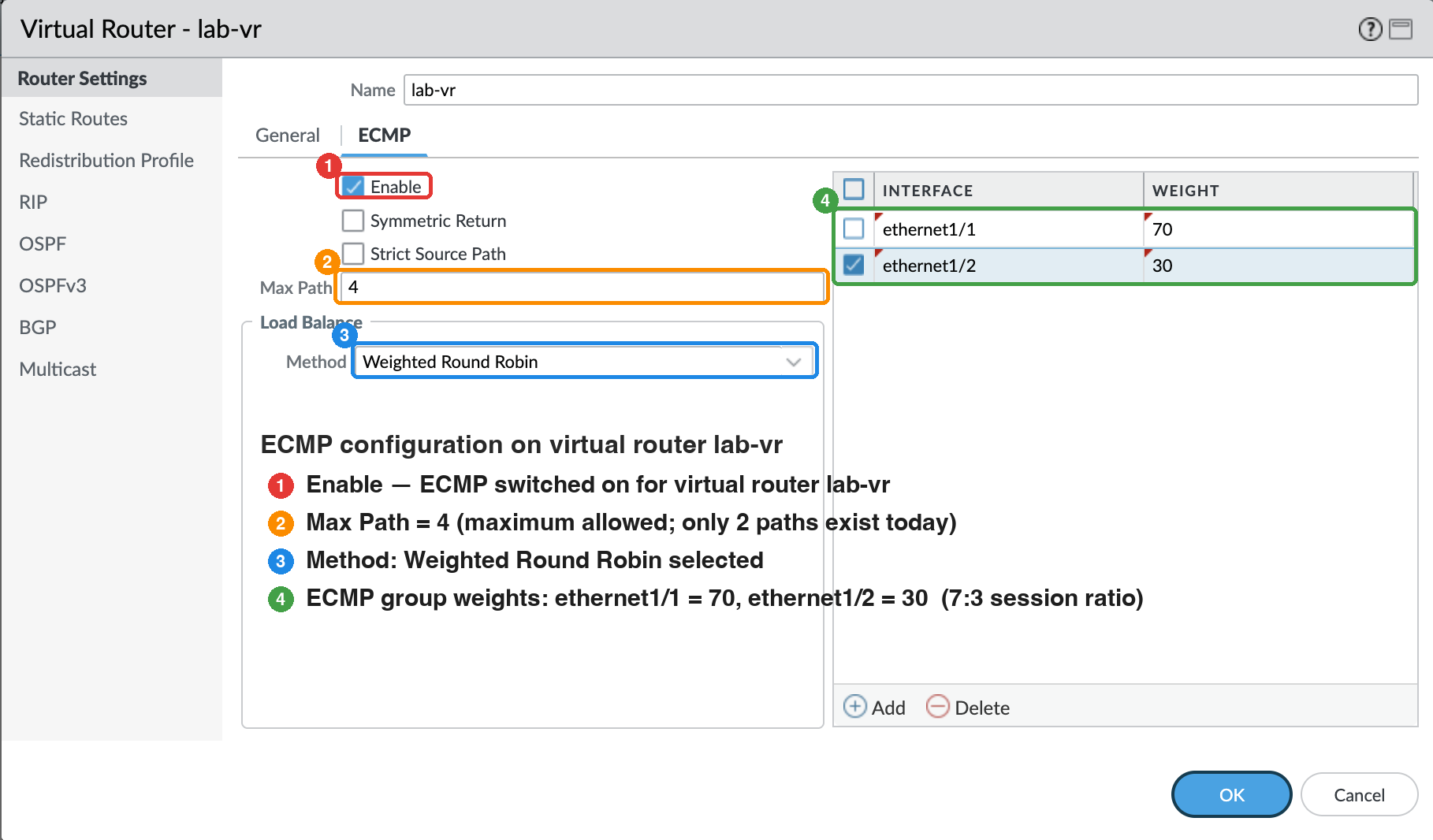
Because ECMP is inherently session-based, the docs are candid that this is a best-effort distribution: sessions aren’t equal in bandwidth, so a 7:3 session ratio is an approximation of a 7:3 load ratio, not a guarantee. Also remember that weights influence path choice within an ECMP group, not route selection between routes of different costs.
Ten new sessions at a 70:30 weight ratio → 7 sessions on ethernet1/1, 3 on ethernet1/2. Assign lower weights to slower/cheaper links and higher weights to faster ones.
Pick this when: the uplinks have different capacities (e.g. 100M + 500M DIA circuits) and you want session share to roughly track bandwidth share.
Choosing at a Glance #
| Algorithm | Path selection | Stickiness | Best for |
|---|---|---|---|
| IP Modulo (default) | hash(src,dst) mod path count | Strong — same flow, same path | Diverse destinations, zero-config |
| IP Hash | hash of configurable tuple (src, src+dst, ±ports, seed) | Strong — tunable | Predictable per-client or per-flow pinning |
| Balanced Round Robin | least-recently-chosen, rebalances on change | None | Even distribution, graceful failure handling |
| Weighted Round Robin | round robin by interface weight (1–255) | None | Unequal link capacities (best-effort) |
Dual-ISP Gotchas Worth Knowing #
Two settings from Step 2 exist specifically for dual-Internet designs:
- Strict Source Path — when the firewall originates IKE/IPsec tunnels and both ISPs provide equal-cost paths, ECMP may pick an egress interface that doesn’t own the tunnel’s source IP. ISPs commonly run an RPF/anti-spoofing check and will drop the return traffic. Strict Source Path forces tunnel-originated IKE/IPsec out the interface that owns the source address.
- Symmetric Return — for inbound flows to published servers behind the firewall, this overrides ECMP and sends responses back out the interface the request arrived on. Enable it when upstream devices (or ISPs) expect symmetric paths.
And the operational notes that will bite you if you don’t know them:
- Enabling, disabling, or changing ECMP restarts the virtual router — existing sessions are terminated. Do it in a maintenance window.
- ECMP is session-granular. A single elephant flow (a backup job, a speed test) pins to one uplink; it never gets split across paths.
- ECMP needs equal-cost routes. Two default static routes with different metrics is just active/standby routing with extra steps.
- ECMP works for any destination, not just the default route — any equal-cost group (static, OSPF, or BGP) is eligible, up to the Max Path limit.
- No ECMP over virtual-router next hops — if the next hop of any equal-cost route is another VR/LR, none of the group is installed in the FIB.
Verifying the Result #
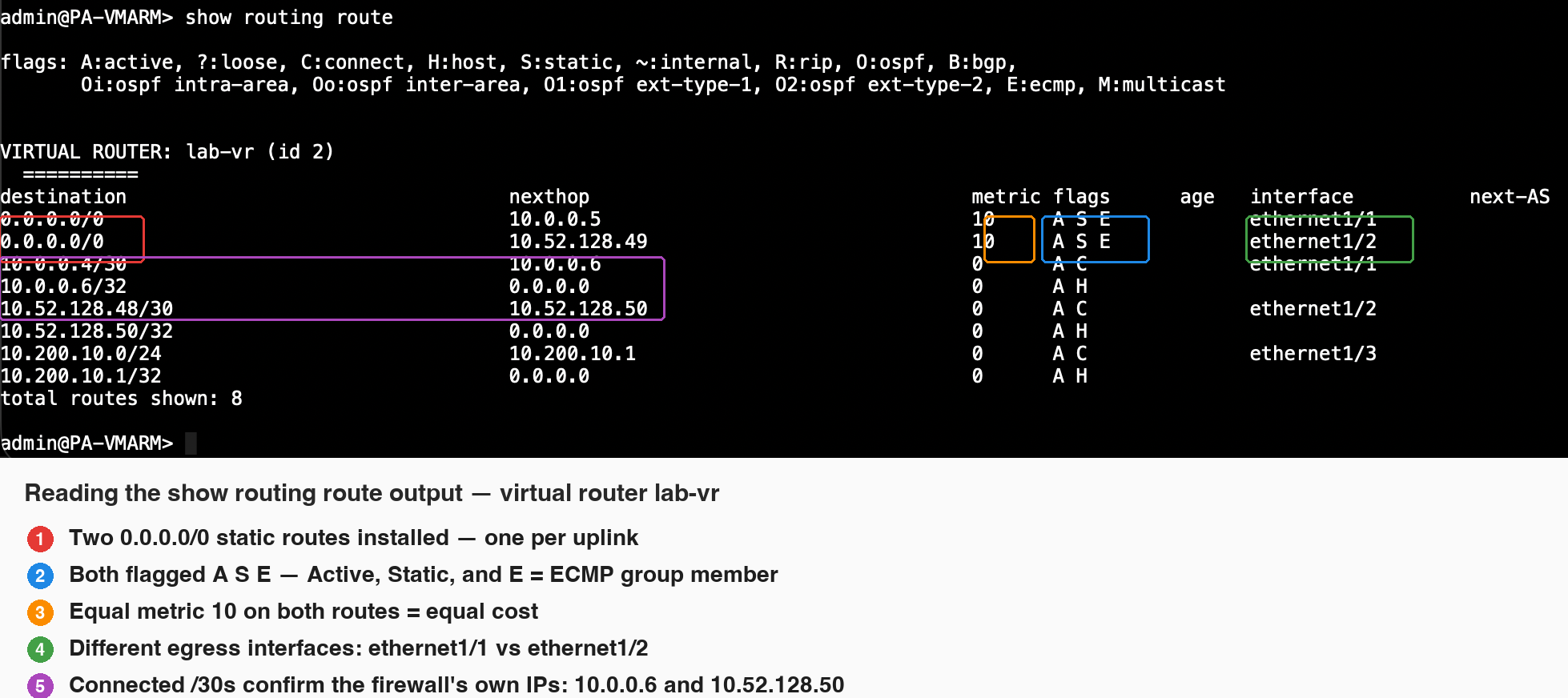
After commit, confirm both paths are actually installed in the RIB:
> show routing route
On lab-vr you should see two entries for 0.0.0.0/0 — one via 10.0.0.5 on ethernet1/1 and one via 10.52.128.49 on ethernet1/2 — both with metric 10 and both carrying the flags A S E: Active, Static, and E for ECMP. That E flag is the proof that both routes are members of the same ECMP group rather than one being a silent backup. The connected /30 routes double as a sanity check of the firewall’s own interface addressing — 10.0.0.6 toward R1 and 10.52.128.50 toward R2 — with 10.200.10.1/24 on ethernet1/3 as the LAN side.
Generate traffic from a few source hosts and watch the session table — the egress interface per session should reflect your chosen algorithm:
> show session all filter destination 203.0.113.50